
Changing what is drawn
Most changes to Un-Banished must leave every frame identical (Compatibility between versions). Some changes are meant to change the picture: a renderer fix that moves it closer to the original game, for example. This page describes how to prove that such a change does what it should, and nothing else. The method was first used for the rock and ore detail levels (commit c128977, see Performance).
The proof has three parts:
- The game's results do not change: every save holds the same game state.
- The frames change only where the change says they will.
- The comparison itself is repeatable: the old build matches itself.
Before you start: predict what will change
Write down which pixels should change before you look at any frame. Then a frame comparison can confirm or refute the prediction. Without a prediction, any difference looks plausible.
- Find the affected objects in the data. For meshes, the
mesh_infoexample lists each part, its detail-level distance and its textures:bashcargo run -q --release -p banished-formats --example mesh_info -- \ game-data/original/WinData Models/Rocks/Rock01Mesh.rsc:resource - Note the condition that makes the change visible: a distance, a season, a video setting, a pass (the scene, the water reflection or the shadow map).
- Count what is affected. "6 of 271 meshes, beyond 50 to 70 units" can be checked. "Some models look different" cannot.
Step 1: keep a copy of your build
The comparison runs for several minutes, and any cargo build in that time replaces target/release/banished. Copy the binary first and compare the copy:
cargo build --release -p banished-app
cp target/release/banished /tmp/banished-new
Step 2: run the comparison
tools/compat/compare.sh HEAD /tmp/banished-newcompare.sh builds the base revision in a clean worktree. It plays each scenario twice with the base build, once with the new build, and then lets both builds continue the base build's saves. It checks the save first (savegame_same) and the frame second (imgdiff, which must report "max_delta":0). The results stay in target/compat/runs/<base>-vs-<new>/, in the folders base-1, base-2, new, continue-base and continue-new.
Run it on its own, not alongside tests or other builds. The scenarios do not depend on the machine's speed, but a busy machine makes them slow.
Step 3: read the verdicts
For an intentional visual change, "NOT COMPATIBLE" at the end is expected. Read each line:
| Verdict | Meaning | What to do |
|---|---|---|
base/base …: identical | The comparison is repeatable. | Continue. |
base/base …: DIFFERENT … | The old build does not match itself. Nothing after this line can be trusted. | See the limits in Compatibility; run again. |
… DIFFERENT game state | The change touched the simulation or the saves. | Stop. A drawing change must never do this. Find the cause with savegame_fields_diff. |
… DIFFERENT frame | Some pixels differ. | Check where (step 4). |
… identical for a scenario you expected to change | The condition never happened in that scenario. | Not an error, but say so. Pick or add a scenario where it happens if you need proof. |
Step 4: find where the frames differ
imgdiff reports the numbers and draws a heat map: the frame in grey, with every differing pixel in red.
R=target/compat/runs/<base>-vs-<new>
cargo run -q --release -p banished-app --example imgdiff -- \
$R/base-1/small-town.png $R/new/small-town.png --out heat.png --json| Field | Meaning |
|---|---|
mismatch_pct | The share of pixels that differ. A local change gives a small share. |
max_delta | The largest difference of one channel (0 to 255). |
bbox | The rectangle that holds every differing pixel. |
grid_pct | The share of differing pixels in each cell of a 4 by 4 grid. |
The example pictures on this page come from the rock and ore change, on the small-town scenario. tools/screenshots.sh --visual-change a94ca1d c128977 makes them again.
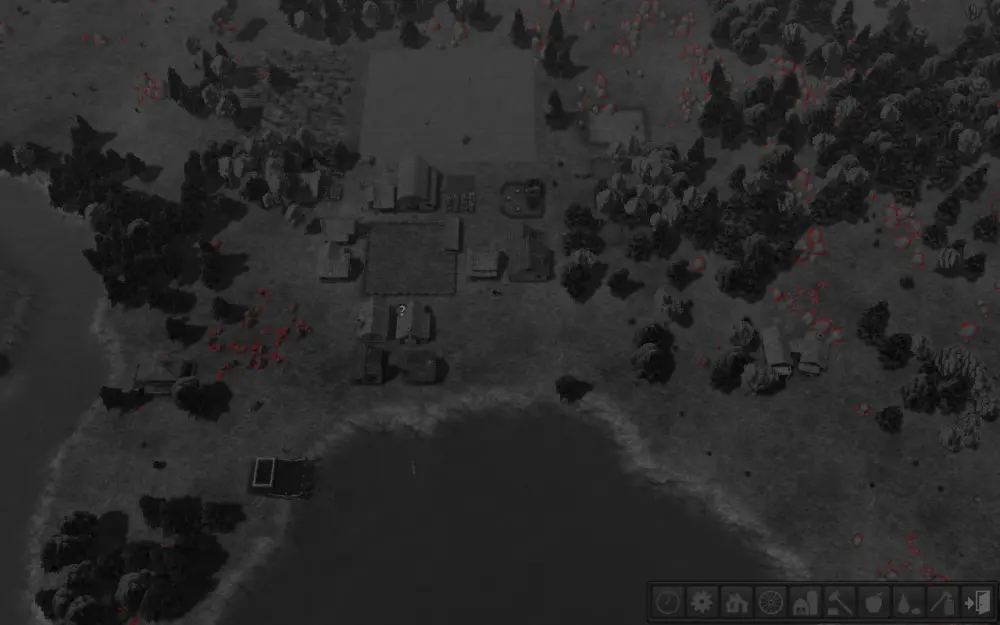
The old build against the new. Red marks every changed pixel: only the grey rocks (top and right) and the iron ore piles (left of the houses). Buildings, trees, terrain, water and the interface did not change. mismatch_pct 0.275, max_delta 80, and the game state is identical.
Open the heat map and check every red area against your prediction. Each one must sit on an object you predicted. A red area anywhere else (a building, the terrain, the interface) is a bug or a missed prediction; find out which before you continue. Also make a heat map of base-1 against base-2. It must have no red at all, and it shows the reader that the comparison is repeatable.
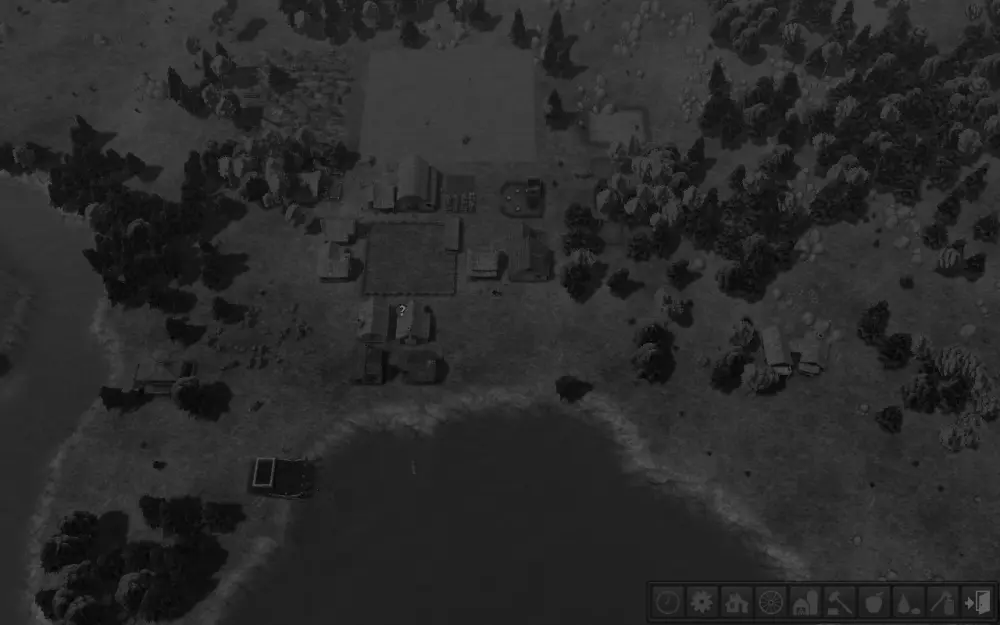
The old build against itself: no pixel differs (max_delta 0).
A difference can appear far from the object. A shadow or a reflection moves with what casts it. That is correct when the change affects the shadow or reflection pass, but say so in the report.
Step 5: look closely
Small differences are hard to see at full size. Cut the same region from both frames and the heat map, and enlarge it without smoothing, so that every pixel stays sharp:
crop() { magick "$1" -crop 240x160+960+250 +repage -filter point -resize 300% "$2"; }
crop $R/base-1/small-town.png before.png
crop $R/new/small-town.png    after.png
crop heat.png                 heat-crop.png
magick before.png after.png heat-crop.png +append side-by-side.png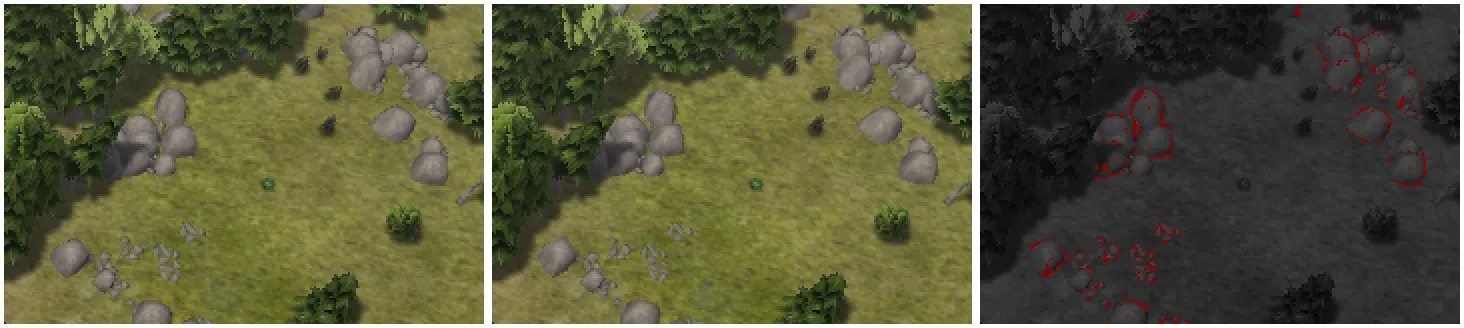
Rocks: before, after, and the changed pixels. Past their switch distance the rocks now use their simpler model, so their outlines and shading change a little.
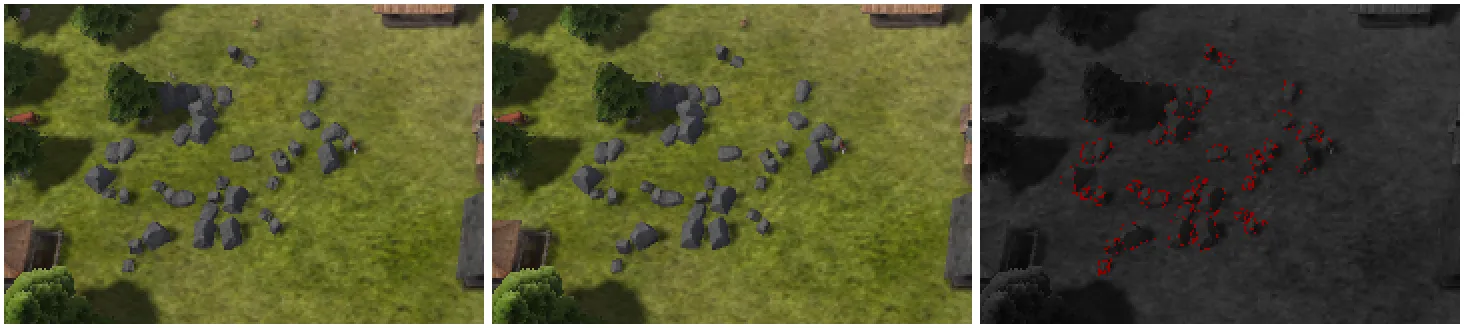
Iron ore: the same three pictures. Every red pixel sits on a piece of ore.
Pick the region from the heat map's bbox or grid_pct. Look at the before and after pictures yourself and describe what changed: "the rocks' outlines are simpler", not "it looks right".
Step 6: report
A report on a visual change states:
- the prediction (which objects, under which condition);
- for each scenario: the game state (it must be identical), the frame verdict,
mismatch_pct,max_deltaand where the differences are; - that the base build matched itself;
- the heat maps and close-ups you opened.
Keep your working frames, heat maps and crops out of the repository. The only pictures in the repository are the screenshots and videos described in AGENTS.md (rule 1), made by tools/screenshots.sh and tools/videos.sh. When a document needs pictures of a visual change, add a mode to tools/screenshots.sh that makes them, as --visual-change does for this page.
Common mistakes
- Comparing against a build that changed. A later
cargo buildoverwrote the binary under test. Compare a copy (step 1). - Reading only the summary line. "NOT COMPATIBLE" hides the difference between a frame change (possibly fine) and a game-state change (never fine).
- Accepting a difference you did not predict. If a red area is not explained, the change is not understood yet.
- Checking one scenario. A change may be invisible in one view and wrong in another. Use every scenario
compare.shruns.