Props, lights and what each sector can see
2026-10-23, ninth session. Two other sessions work in parallel: one on reading the CD image directly, one on the MMX and 3D-card builds.
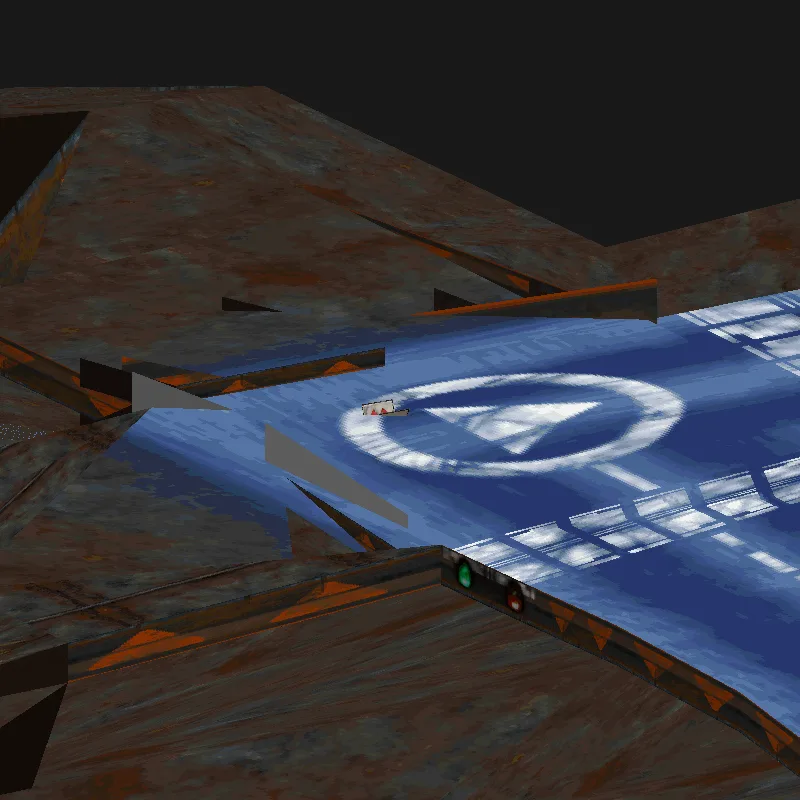
CIRCUITS/ALDERON.BL3 near its start, drawn by pod-viewer render ALDERON.BL3 --zoom 40 --focus 468,-230,0. The small sign on the road is one of the placed props. © Ubi Soft; shown from our own viewer.
What each sector can see
Right after the sectors comes a table with one list per sector: the numbers of other sectors. A sector never lists itself, and the lists hold 4 to 12 sectors on average. This is how the game decides what to draw when the car is in a given sector. One track has a negative count in its table; the game treats any count below one as an empty list, and so does our reader now.
Props
Next comes an environment section, on 11 of the 18 tracks. It is a small library of prop types, then a list of where each one stands. The types are named like cone.dec, bidon.dec (a drum), carton3.dec (a cardboard box), pancarte.dec (a sign) and busdec.dec. Each type is a full animated object, the same structure the car file ends with: its own texture page, a model and a few frames of animation.
Each placement is 56 bytes: the type, a count of references, a position and a 3 by 3 rotation. To check them without trusting a picture, every prop's distance to the nearest track vertex was measured: 5 to 30 units, on tracks 900 to 2,400 units across. Every rotation row has length 1. The props sit on the road.
The 16-bit .BL4 files hid two surprises here. Their props have 128 by 128 texture pages, while the track's own pages are 256 by 256. And their props' faces lack the extra word that the track's faces carry. Some props' faces also have no material name at all; the face reader only reads one when asked, so for now a face that starts with a corner count is read as unnamed.
Lights
The lighting section holds a global light (a direction, four values and a colour) and lists of point lights. Most tracks use only the global light; Beltane has 18 point lights.
A closer camera
The viewer's renderer can now zoom in and look at a chosen point, so an agent can take a picture of any spot on a track: --zoom and --focus x,y,z. The picture above came from one command.
The tracks page has the layout.
Next
The animation library (.anc) is the next section, and after it the sky.