Controls, keys and graphics options
2026-10-24, the front end's session.
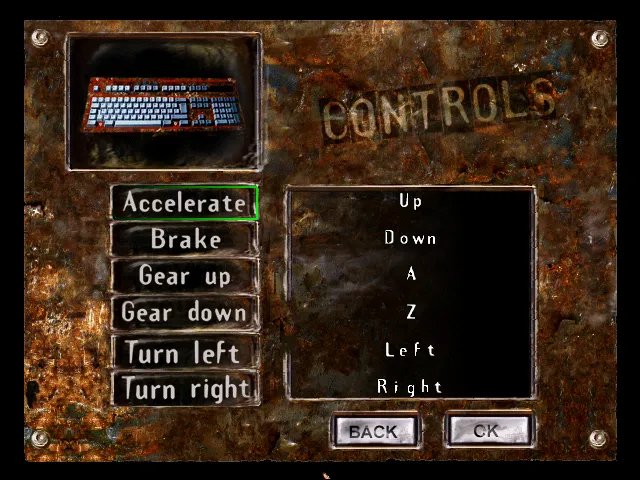
The controls menu
The controls menu chooses each player's device: keyboard, pad, wheel or joystick. Gold shows the three game devices only when DirectInput found a joystick. The emulated PC has none, so in the capture they are hidden and the background's dim pictures show through. Player 2 cannot take the keyboard if player 1 has it, and with a single joystick only one player gets a game device. The host now tells pod-ui which joysticks there are.
The key names
The keyboard's configuration lists each action's key. Gold names special keys from the menus' text (section KIBOARD: "Up", "Down", "Left", "Right" and more) and writes F1 to F12 out. Any other key is the single character the keyboard layout gives its scancode, from a table the game builds at start-up. pod-ui assumes a US layout, which the English capture's "A" and "Z" fit. Choosing a new key is not ported yet.
The graphics options
The graphics options read four Ubi.ini keys and write them back on the way out: LevelView (default 3), ComputeView, LetterBox and DisplayMode. 640 x 400 and 512 x 384 can be chosen only when DirectDraw lists them in 16-bit colour, which the emulated PC does not. The resolutions, the three options and the level slider are ported.
The garage's empty box
The garage had one open question: a small field that the original shows empty. It is one of five "time" items, on the car screen, the garage, two championship menus and the race end. Gold hides them all outside time attack (0x431eb8), and the car screen runs that before the garage opens. With it ported, the garage matches with nothing left out.
Next
The race end's two pages, the ranking and the all-time best laps, against the captures of the Azthec race. Their drawing is read in outline; the text positions come next.