Media, files and protection
These pages cover what a game came on and what its files are, before the code that reads them is traced. Read them during re-inventory and re-format.
- CDs and DVDs: sectors and tracks, CD audio, Mode 2, the file systems, which image to work from,
discinfo.py. - Floppy disks and booter games: image levels from sectors to flux, floppy protection, PC games that boot without DOS.
- Identifying unknown files: signatures, entropy, structure from the numbers, comparing two files, simple obfuscation, timestamps.
- Flash and Shockwave games: web games whose player no longer runs, SWF files and projectors,
swfinfo.py. - Packed and protected code: packers, getting the code out, data decoders, debugger checks, copy protection and the port.
Handling the game as evidence covers the habits that keep each result repeatable: identifying the copy, keeping it unchanged, and tying findings to it.
Ask your agent
text
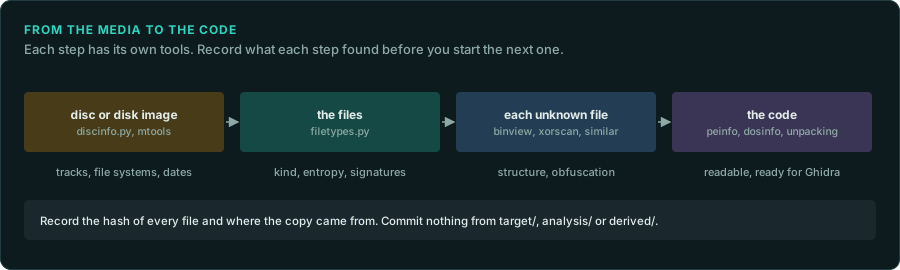
In my GameFrame project, find out what the game came on and what each of its files is.

1. Read docs/media/README.md and the re-inventory skill.
2. If the game is on a CD or disk image, run tools/disc/discinfo.py on it and record the
   tracks, the file systems and the dates.
3. Run tools/triage/filetypes.py on the game folder. List each kind of file with its entropy,
   and mark the ones that look compressed, encrypted or packed.
4. Record the hashes of every file (tools/triage/compare_trees.py --hashes) and where the copy
   came from, as docs/working/evidence.md describes.
5. Write it all in docs/FINDINGS.md. Commit nothing from target/, analysis/ or derived/.