Network games
A multiplayer game is two programs. One is the client the player runs. The other is a server, which is often gone. When the company turns its servers off, the game's online part stops. The protocol between the two programs is all that remains to rebuild a server. This page covers recording a protocol, reading its messages, and checking a rebuilt server or client against the original. Online and network games covers the rules such games share.
Recording the traffic
- A local server. Many games of the era shipped a dedicated server or let one player host. Run both on one machine and capture the loopback interface. Nothing leaves the computer.
- A live service that still runs. Capture your own client's traffic. Read the service's terms first. Some forbid analysing their protocol.
- A service that has closed. Captures taken while it ran, by you or by a community, are the evidence. Ask where they came from and keep that with them.
Wireshark and tcpdump write .pcap and .pcapng files. Record each capture with what you did in the game, second by second, so a message can be matched to an action.
Reading the messages
python3 tools/formats/pcap.py derived/net/lobby.pcapng                       # the flows
python3 tools/formats/pcap.py derived/net/lobby.pcapng --flow 0 --dir b --dump derived/net/msgs
python3 tools/formats/fields.py derived/net/msgs --png derived/net/msgs.png  # what each offset holds
python3 tools/formats/fields.py derived/net/msgs --by-type 2                 # each type's own layout
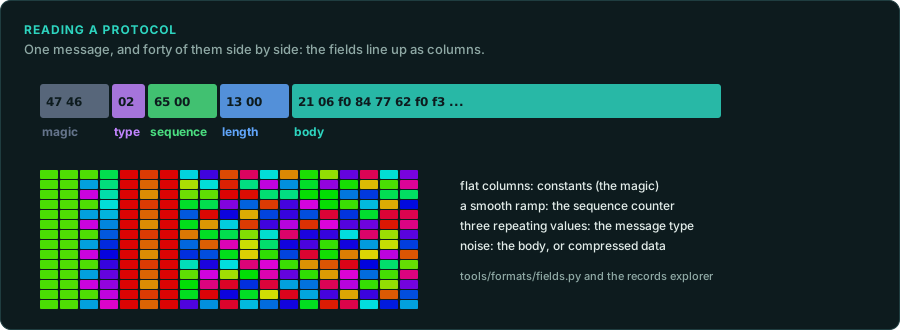
pcap.py lists the conversations and writes each message as a file. fields.py lines the messages up and reports, for each offset, a constant, a counter, a length or a small set of values. The records explorer shows the same in the browser, with the messages as rows of colour.
- Find the framing first. A UDP datagram is one message. A TCP stream needs a length field or a terminator to split it. Join a TCP direction with
pcap.py --stream, then look for a length near the start of each message. - Then the type. One byte near the start often selects the message type. Each type then has its own layout. Group by it (
--by-type). - Then the counters and the checksums. Sequence numbers rise by a fixed step. A checksum changes completely when any other byte changes. Find the function that computes it (
tools/triage/constants.pynames CRC tables). - Compressed or encrypted messages look like noise in every column. Many games compressed with zlib, so try zlib on the message bytes first. Otherwise, find the code that sends. Break on the socket calls (
send,sendto,WSASend) and read the buffer before it is encoded. - Match messages to actions. The capture's timestamps and your notes say which action sent which message. Coverage diffing finds the code that builds it (Debugging the original).
Checking a rebuilt server or client
- Replay the client's messages from a capture to the rebuilt server, and compare its replies with the original server's replies in the same capture.
- Run the original client against the rebuilt server, and capture again. The new capture should match the old one, apart from values that change by design: times, session ids, random seeds.
- Record every field whose meaning is guessed, and which captures show it.
Care with online services
Run rebuilt servers for games whose official service has closed, or for your own local play. Do not connect modified clients to services that still run, and do not get around a service's checks. Many services forbid it, and some countries' laws do too (Legal).