Floppy disks and booter games
Most games before the mid-1990s shipped on floppy disks. A disk image can keep the files only, the sectors, or the magnetic signal itself. Which one you need depends on whether the game reads the disk through the system or in its own way. This page covers the general points and the PC games that boot from a disk without DOS. The pages for each computer cover their own formats and protections: Amiga, Atari ST, Apple II, Commodore 8-bit and IBM PC.
Three levels of image
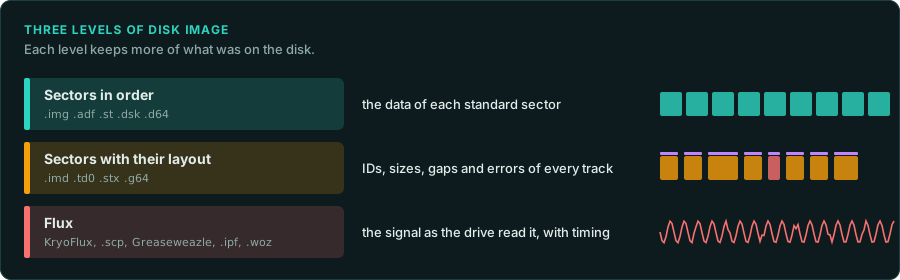
| Level | Examples | What it holds | Enough for |
|---|---|---|---|
| Sectors in order | PC .img and .ima, Amiga .adf, Atari .st, Apple .dsk, C64 .d64 | The data of each standard sector, in a fixed order | A game that reads its disk through the system |
| Sectors with their layout | ImageDisk .imd, Teledisk .td0, Atari .stx (Pasti), C64 .g64 | Each track's sector list: IDs, sizes, gaps, errors | Most disks with unusual sectors |
| Flux or bit level | KryoFlux streams, SuperCard Pro .scp, Greaseweazle, .ipf, Apple .woz | The signal as the drive read it, with timing | Any disk, including weak bits and long tracks |
A disk is tracks on one or two sides. Each track holds sectors. Each sector has an ID field (track, side, number, size) before its data. A PC disk uses MFM encoding with 512-byte sectors: 9 per track on a 720 KB disk, 18 on a 1.44 MB disk. The Apple II and the Commodore drives use GCR encoding with their own layouts.
Copy protection on floppies used what a sector image cannot hold. Examples are sectors with IDs or sizes outside the normal set, a sector with a deliberate CRC error, a track longer than normal, and weak bits that read differently each time. The game reads these through the BIOS (interrupt 13h on a PC) or by programming the disk controller's ports directly (3F0h to 3F7h on a PC). When the game checks for them, a plain sector image fails. Keep the most complete image you have as the record of what shipped. Then work from the files or from memory after the loader, as Snapshot after the loader describes. Copy protection is described here as facts. The law on working around it differs by country (Legal). You decide which route to take.
Games that use DOS's files
Most DOS games keep their data in ordinary files. Copy the files out of the image with mtools (mcopy -i disk.img -s ::* target/disk1/) or mount the image. Then work on the files as with any other release. Note which disk each file came from. An installer may combine or decompress them, and the game may ask for a disk by its volume label.
Booter games on the PC
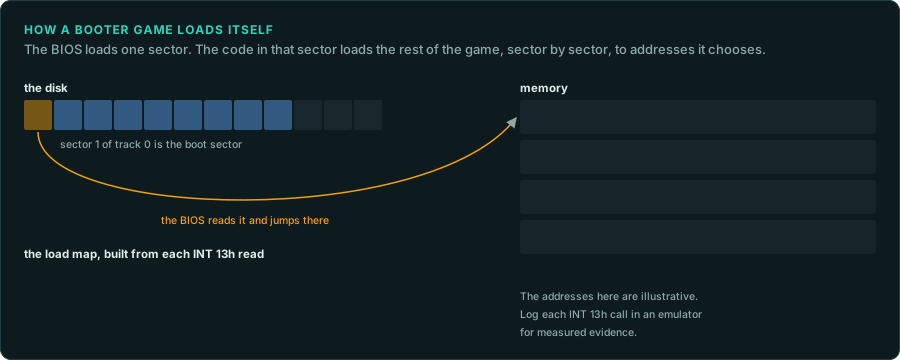
Some early PC games boot from their own disk without DOS. The BIOS reads the first sector of the disk (the boot sector, 512 bytes) to address 0000:7C00 and jumps there. That code loads the rest of the game with interrupt 13h, sector by sector, to addresses it chooses. There is no executable file and no header to tell a disassembler where anything goes.
- Read the boot sector. Load the first 512 bytes into Ghidra as raw 16-bit x86 code at
0000:7C00. Find the calls to interrupt13h: each one gives a track, a side, a sector, a count and a destination address. - Build a load map. List each read as source sectors, destination address and size. A loader that reads more loaders repeats the step. Running the disk in an emulator with a debugger gives the same map as measured evidence. Log each interrupt
13hcall and its registers. - Load the game as memory blocks. Give Ghidra each block at its destination address, or dump the whole memory once the game runs and load that dump.
- Find the game's own services. A booter talks to the hardware directly. It has its own keyboard handler, timer handler, video code and sound code. Inputs lists the ports and interrupts to look for.
Emulators that boot a disk image:
| Emulator | Use |
|---|---|
| DOSBox-X | The BOOT command starts a disk image. Its debugger logs interrupts and dumps memory |
| 86Box and PCem | Exact IBM PC and XT models, for timing-sensitive booters |
| Bochs | A debugger that can stop at 0000:7C00 and at each interrupt |
MAME (ibm5150 and others) | Cycle-accurate PCs, with a debugger and memory views |
GameFrame's emulators (tools/emu/dos_emu and tools/emu/dos_env) load DOS programs in the MZ and NE formats. They do not boot disks. For a booter, take the load map and a memory dump from one of the emulators above. Use them as measured evidence and as Ghidra's input.
What to record
- Each disk: its label, its format (720 KB, 1.44 MB, or another), the image level you have, and its hash.
- Whether the game reads files through DOS or reads sectors itself.
- For a booter: the load map, with the evidence for each entry.
- Any sector or track that a sector image does not hold, and what the game does with it.