Permissions and gates
GameFrame and every project made with scripts/new-project.sh come with a light set of permissions and four hooks for Claude Code. They live in .claude/settings.json. The plugin carries the same hooks in hooks/hooks.json. The aim is to let an agent work without a prompt for each command it runs. The project's rules still hold for the few mistakes that cost the most.
Hooks are a safety net for honest mistakes. They are not a security boundary. An agent that means to get around them can. The rules in AGENTS.md and the skills still apply in full.
Permissions
Claude Code checks the deny list first, then the ask list, then the allow list. A command on none of the lists follows the session's permission mode.
| List | Commands | Why |
|---|---|---|
| Allow | ./gameframe, the scripts in scripts/ (Ghidra export and run, DOSBox, the installer extractor, setup.sh without --install), tests/run.sh, the tools under .venv/bin/python tools/ and truth/ | The toolkit's own commands. They read the game and write only to ignored folders. |
| Allow | git status, diff, log, show, add, commit, pull | Every slice ends with a commit. The commit gate checks each one. |
| Ask | git push | A push publishes the work. The user sees each one. |
| Ask | scripts/setup.sh --install, brew install, cargo install, npx -y rea-agents@6.4.0 setup, sudo, curl, wget | These install software or download files. The project asks before any download. |
| Deny | git add -f, git add --force, git push --force, git push -f | A forced add is the usual way game material reaches git. A forced push can destroy another session's work. |
Everything else, such as reading files, running cargo, objdump or python3, is left to the session's mode. The lists do not try to name every tool an agent may need.
Gates
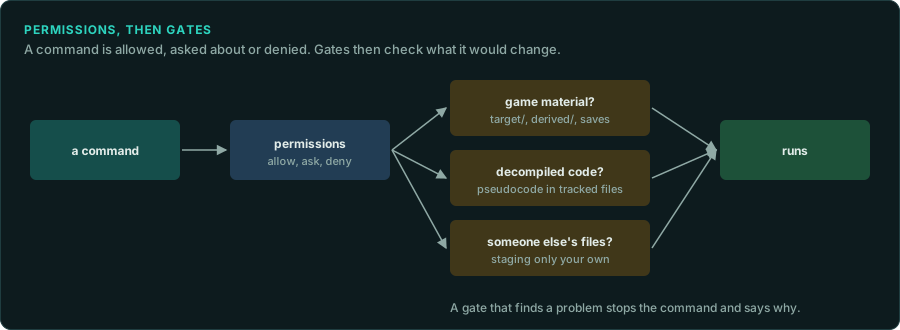
scripts/hooks/gate.py runs before some tool calls. A gate that blocks exits with status 2 and writes the reason on stderr. Claude Code shows the reason to the agent, which can then fix the problem. In every other case the gate exits 0 and changes nothing.
| Gate | When | It blocks |
|---|---|---|
commit | Before git commit | Staged files in target/, analysis/, derived/, game-data/ or save-game/. Staged game binaries and data files (.exe, .dll, .ovl, .pkg, .sav, .wad, .pak, ROM images and others). Added lines that look like Ghidra's decompiled code. A commit made by a GameFrame agent other than re-lander. |
push | Before git push | A push made by a GameFrame agent other than re-lander. |
write | Before Write and Edit | Writing two or more lines of decompiled code into a file outside analysis/, derived/ and target/. |
session | When a session starts | Nothing. It adds a short note to the session: whether .env, .venv and the Ghidra export exist, and the next three open items in docs/CHECKLIST.md. |
The commit gate also checks git commit -a, which stages tracked changes as it commits.
What counts as decompiled code
Ghidra's decompiler writes names and forms that people do not write by hand: undefined4, CONCAT44(, SUB41(, ZEXT14(, (**(code **), /* WARNING: , and variables such as unaff_EBX, in_stack_00000008 and extraout_EAX. The gates look for these. One such line can appear in prose that explains a type. Two or more lines in one write or one commit are blocked.
Function addresses such as FUN_1400be770, offsets such as +0x44 and constants pass. They are how findings cite the original.
Which agents may commit
Only re-lander commits and pushes. The other stage and task agents end with a hand-off that names the next agent. When an agent such as re-tracer tries to commit, the gate tells it to hand off to re-lander. The main session is not an agent, so it can commit and push. The permissions still ask before a push.
Changing them
Put personal additions in .claude/settings.local.json, which git ignores. Claude Code merges its lists with the ones in .claude/settings.json. An entry there can allow more commands. It cannot undo an ask or a deny entry from the shared file, because deny and ask are checked first. To change those for everyone, edit .claude/settings.json in the project. To turn a gate off for one project, remove its entry from the hooks section.
When a gate blocks something that is correct, change the gate rather than working around it. Add a test for the case to tests/run.sh, in the section named "Gates".