Getting more from Ghidra
The re-ghidra skill covers the daily work: export a binary once, query the text, decompile single addresses, apply labels. This page covers the techniques for larger questions. Some cover a whole program at once. Others carry work from one build to the next, or handle code that is not an ordinary executable.
Every call to a function, with its arguments
ExportCallArgs.java lists every call to chosen functions. For each call it gives the arguments the decompiler can reduce to a constant, a string or a global. It reads Ghidra's P-Code, the processor-independent form the decompiler works on. It therefore works the same way for x86, 68000, MIPS and every other processor Ghidra supports.
scripts/ghidra-run.sh game.exe callargs analysis/notes/sounds.tsv PlaySound play_sfx
scripts/ghidra-run.sh game.exe callargs analysis/notes/files.tsv fopen CreateFileA open_resource
scripts/ghidra-run.sh game.exe callargs analysis/notes/random.tsv rng_next random_range
One run answers questions such as these:
- every sound the game plays and the id it passes;
- every file it opens by name;
- every random draw and its range;
- every message box and its text.
Arguments that are not constant show as the variable's name. A pointer to a local variable shows as &local. Follow those in the calling function.
Code that is not an executable file
A booter game's load map, an unpacked memory dump, a console ROM with banks, or overlays that the game loads at run time have no header to tell Ghidra where they go. AddMemoryBlocks.java builds the memory from a map of pieces. Each line of the map gives a file, an address, an optional offset and length, a name, and code to disassemble from the piece's start.
# derived/loadmap.tsv: file, address, offset, length, name, code
boot.bin	0000:7c00	0	0x200	boot	code
disk1.img	1000:0000	0x2400	0x9000	game	code
disk1.img 2000:0000 0xb400 0x4000 dataanalyzeHeadless analysis/raw re -import derived/boot.bin -loader BinaryLoader \
-loader-baseAddr 0000:7c00 -processor "x86:LE:16:Real Mode" \
-scriptPath tools/ghidra -postScript AddMemoryBlocks.java derived/blocks.txt derived/loadmap.tsv \
-postScript ExportAll.java analysis/exportA piece that overlaps an existing block becomes an overlay. This suits code banks that share an address range. The script analyses the new blocks. ExportAll.java then writes the usual text export. Floppy disks and booter games describes how to make the load map.
Carrying labels to a new build
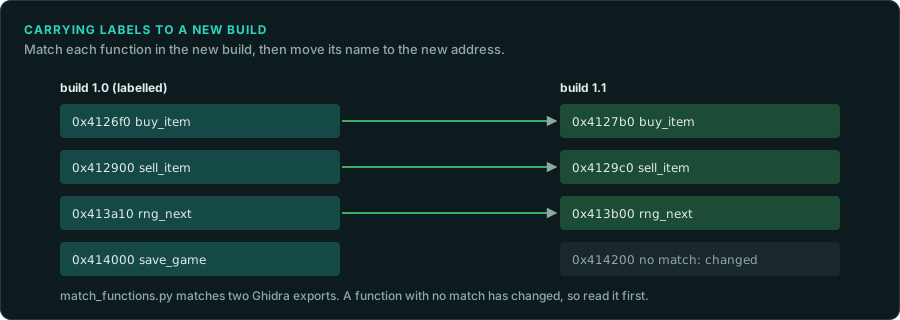
When a patch or another release arrives, the addresses move. Most functions stay the same. tools/triage/match_functions.py compares two exports and matches the functions. It uses the same pseudocode once addresses are removed, shared pieces of pseudocode, and the order of calls from matched functions. Then it writes your labels at the new addresses:
scripts/ghidra-export.sh --out analysis/export-v12 target/v12/game.exe
python3 tools/triage/match_functions.py analysis/export/game.exe analysis/export-v12/game.exe \
    --labels labels/names.tsv --out labels/names-v12.tsv
Each label it writes records how it matched and with what score. Review the fuzzy matches your port depends on before you apply the file with ghidra-run.sh labels. The same command compared with a known library's export finds the library functions in a game. With the sample game, it matches the C runtime functions shared by the executable and its DLL.
Ghidra has two heavier tools for the same job. Version Tracking compares two programs inside Ghidra, with several correlators, and carries names, comments and types across. BSim stores a feature vector of each function in a database and finds similar functions across many programs, even built for other processors. BSim can keep its database in a local file, so it needs no database server for one person's work. Use them when the text comparison is not enough. Examples are a different compiler, a different optimisation level, or many releases at once.
Naming library code with Function ID
Ghidra's Function ID names functions by hashing their instructions and comparing them with databases of known libraries. Ghidra ships databases for common Visual Studio runtimes. For another compiler of the era, such as Watcom, Borland or an old Visual C++, build a database yourself. Analyse the library's own .lib files or a program built with them, and create a Function ID database from those programs with the Function ID plug-in. Then apply it to the game. The names it gives can go into the labels file, with "Function ID" as the evidence.
Types for the port
Once the structures of the game are typed in Ghidra, export them as a C header from the Data Type Manager. The header gives each field's offset and type in one place, which helps when you write the port's own types. Keep the header in analysis/ if it includes the original's names from symbols. Write the port's types in your own words (Legal).
Processors Ghidra does not know
Ghidra describes each processor in SLEIGH, a language for instruction sets. The community has written modules for many processors of the era that Ghidra lacks. Console tools lists the ones for consoles. When none exists, writing one is a large job. A loader for a format is a smaller job. So is a memory map for AddMemoryBlocks.java. Both are often enough when the processor itself is supported.
Scripts and headless runs
Every GameFrame Ghidra script runs headless through scripts/ghidra-run.sh, on an analysed project, without analysing again. A new question that needs the whole program is usually a short script in tools/ghidra/. Start from the closest existing script, write its output as text, and give it a mode in ghidra-run.sh so agents can find it with gameframe tools.