GameFrame
GameFrame is an agentic framework for reverse engineering games. Its playbook of skills and agents runs inside your coding agent. Its toolkit of tested tools checks every result against the original. AI agents and people use it to study a game from its shipped files. They document its formats and rules, and reimplement it so it behaves exactly like the original.
The toolkit works with Ghidra, the Unicorn emulator, REA (Reverse Engineer Anything) and, for DOS games, DOSBox-X and its debugger. GameFrame grew out of Un-Banished, a 1:1 reimplementation of the game Banished built this way; see the case studies.
Set it up with your agent
Copy this prompt into your coding agent (Claude Code, Codex, Cursor or another). It clones GameFrame and checks your tools. It asks before it installs anything, then starts a project for your game.
Set up GameFrame on this computer for me.

1. Clone https://github.com/tanepiper/game-frame into ~/code/game-frame
   (or update it with git pull if it is already there).
2. Read AGENTS.md and .claude/skills/re-setup/SKILL.md.
3. Run scripts/setup.sh and show me the table of what is present and what is missing.
4. Before you install anything, tell me what scripts/setup.sh --install will install and how
   large each part is. Wait for my answer, then run it.
5. Run tests/run.sh --ghidra and report how many checks passed. If any failed, show the
   failures and fix the setup before going on.
6. Run scripts/setup.sh --rea and help me register REA with this agent.
7. Ask me for the name of the game and the folder of my own copy of it. Then run
   scripts/new-project.sh ~/re/<short-name> "<Game Name>" "<path to the game>".
8. Open the new project, read its AGENTS.md, and start with the re-start skill.

Never copy the game's files, extracted assets or decompiled code into a git repository.
To set it up by hand instead, follow the quick start.
Framework, playbook and toolkit
GameFrame is the whole framework. It has two parts.
The playbook is the method and the rules an agent follows:
- the skills in
.claude/skills/re-*/, one per step of the method; - the stage agents in
agents/, packaged with the skills as a Claude Code plugin (.claude-plugin/); - the rules in
AGENTS.mdand, for each game, in the project's ownAGENTS.md(templates/project/).
The toolkit is the tested tools the playbook runs:
- the tools in
tools/, such as the Ghidra export and query, the Unicorn emulators, format validation and the bit-exact comparison tools; - the scripts in
scripts/, such as setup, new-project and the Ghidra runs; - the checks in
tests/run.sh, which prove every tool on the samples inexamples/.
Quick start
git clone https://github.com/tanepiper/game-frame.git
cd game-frame
scripts/setup.sh --install          # Ghidra, JDK 21, objdump, Node, Zig, and .venv (unicorn, pefile, capstone)
tests/run.sh --ghidra               # proves every tool on the sample game (about 1½ minutes)

scripts/new-project.sh ~/re/mygame "My Game" "/path/to/My Game"   # a project for one game
Then open the new project with your agent and ask it to start with the re-start skill. Claude Code finds the skills in .claude/skills/ automatically; other agents read AGENTS.md and the SKILL.md files.
As a Claude Code plugin
The skills and the stage agents are also a Claude Code plugin. In Claude Code:
/plugin marketplace add tanepiper/game-frame
/plugin install gameframe@game-frame
The plugin brings the skills, the agents and the MCP servers in .mcp.json. The tools still run from a clone of GameFrame or from a project made with it: re-start says so first.
Find your way with gameframe
./gameframe is a small command for help and discovery. It reads the skills and the tools' own help from the files, so it never goes out of date. It needs only Python 3. Every new project gets a copy.
./gameframe steps                      # the method's loop, each step with its skill
./gameframe skills                     # every skill in one line
./gameframe skill re-trace --sections  # a skill's headings; --section TITLE prints one part
./gameframe tools                      # every tool and script, with its first line of help
./gameframe tool decomp_query          # one tool's full help
./gameframe run peinfo target/game.exe # run a tool with GameFrame's .venv
./gameframe find vtable                # which skills and tools mention a word
./gameframe doctor # the toolchain check (scripts/setup.sh)steps, skills, tools, tool and find also print JSON with --json, for agents and scripts.
The method
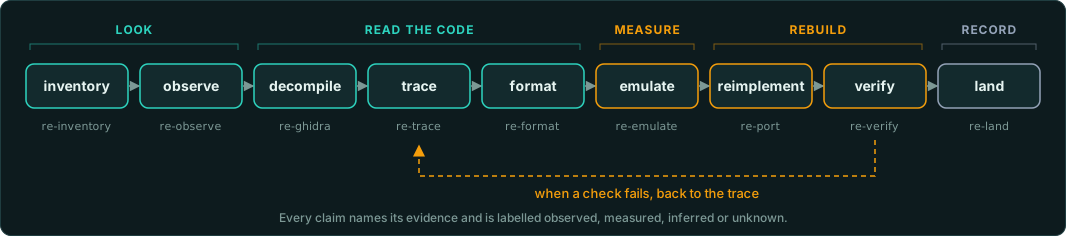
Write each claim with its evidence (an address, a value, a measurement) and one label: observed, measured, inferred or unknown. Measure each number the reimplementation must match by running the original function under the emulator. The reimplementation must give the same result bit for bit.
Skills
Each skill is a self-contained guide for one step: when to use it, exact commands, what evidence to produce, and the pitfalls that cost time.
| Skill | Step |
|---|---|
| re-start | Rules, the loop, a first-session checklist, routing to the other skills |
| re-setup | Install and check the toolchain; register REA for your agent |
| re-inventory | Which files hold the game's code; native, managed, scripted or packed; engine and middleware; data containers; what kind of game it is |
| re-observe | Run the original where you can watch, drive and capture it; every input; every screen; an object model with entry points for tests and agents |
| re-rea | When to use REA's MCP tools, and how they fit with the text export |
| re-ghidra | Headless export, queries, one-off decompiles, vtables, constants, checking the disassembly |
| re-trace | From a string, import, export or class name to the function, its fields and constants |
| re-format | Decode archives, resources and saves; prove decoders on every file |
| re-emulate | Run original functions under Unicorn for ground truth; trace random draws |
| re-port | Reimplement exactly: precision, order of operations, draw order, iteration order; an exact core with commands, digests and a headless runner; additions (multiplayer, mods) kept apart |
| re-verify | Bit-exact parity, draw order, determinism with digests and on every platform, recordings, saves, pictures, version against version, test tiers |
| re-land | Document in evidence style, label, commit safely |
Stage agents
One agent per stage of the method, in agents/. Each has its skills preloaded, does only its stage and ends with a hand-off that names the next agent. The main session sends them one at a time; only the lander commits. re-start ("Stage agents") has the table of hand-offs. Permissions and gates lists what runs without asking and the hooks that block game material, decompiled code and commits by other agents.
re-surveyor → re-observer, re-decompiler → re-tracer → re-decoder, re-measurer → re-porter → re-verifier → re-lander, and back to the tracer or the porter when a check fails.
Nine task agents do one job each, in any stage: re-identifier (engine and libraries), re-randomiser (random generators and draw order), re-listener (every input), re-cataloguer (every screen), re-mapper (hardware and memory), re-typer (structures and classes), re-matcher (a crate or library against the game), re-editor (documents to the writing rules) and re-checker (claims and sources). re-start ("Task agents") has their table.
Agent teams shows how the agents work together: seven teams for common pieces of work (start-up, an exact system, a data format, the main loop, the interface, sound and hardware, documentation), each with a diagram of its hand-offs, the data passed between agents, the outcome, and the failure path.
Scripts
| Script | What it does |
|---|---|
scripts/setup.sh [--install] [--rea] | Checks every tool; installs what is missing; shows REA's registration plan |
source scripts/env.sh | Sets GAMEFRAME_ROOT, loads .env, puts gameframe and the .venv Python on PATH, for each shell or agent session |
scripts/new-project.sh DIR "Name" [GAME] | Creates a project for one game: rules, skills, tools, ignored folders for the game and its derivatives |
scripts/ghidra-export.sh [--labels FILE] BINARY... | Headless Ghidra analysis and a text export: pseudocode, functions, strings, imports, exports; names applied from a labels file |
scripts/ghidra-run.sh BINARY decompile|named|refs|vtable|labels|callargs|blocks OUT ARGS | One-off jobs in the analysed project, without re-analysis: also every call with its arguments, and raw memory pieces |
scripts/extract-installer.sh [--detect] INSTALLER OUT | Unpacks an installer or package without running it: Inno Setup (GOG), NSIS, InstallShield, MSI, archives, .dmg, .pkg, GOG's .sh, CD images |
scripts/dosbox-run.sh [--fileio] [--break] [--mcp PORT] DIR PROGRAM | Runs a DOS program in DOSBox-X without a window: exit code, file I/O log, debugger control |
./gameframe COMMAND | Help and discovery: the steps, the skills, every tool's own help; runs a tool with the .venv |
tests/run.sh [--ghidra] | 147 checks (159 with --ghidra) of every tool against the two sample games |
Tools
| Tool | What it answers |
|---|---|
tools/disc/discinfo.py | A CD image (CUE/BIN, ISO): tracks, CD audio, Mode 2 sectors, ISO 9660, Joliet, HFS, El Torito, dates; copies files and audio out |
tools/triage/filetypes.py | What each file is from its bytes: signature, entropy, compressed or packed |
tools/triage/similar.py | How much two files or two releases share, even when they differ; renamed files |
tools/triage/binview.py | A file drawn as a picture, one pixel per byte, by kind of byte or by entropy |
tools/triage/tables.py | Sine and cosine lookup tables, with their steps, scale, type and rounding |
tools/triage/sigscan.py | Byte signatures with wildcards: make them from named functions, find them in another build or a game |
tools/triage/insns.py | Every instruction of a kind: port access, interrupts, timers, divisions |
tools/triage/pointerpaths.py | A chain of pointers from a global to a value that moves between runs |
tools/triage/coverdiff.py | The code that ran only with an action: two coverage logs (drcov or address lists) compared, by function |
tools/triage/fixity.py | A BagIt bag of a game copy with checksums; manifests in place; verification over time |
tools/triage/constants.py | Random generators, checksums, hashes, ciphers and decompressors named by their constants, with addresses |
tools/triage/hashnames.py | Which hash function names things, and the name behind each hash constant |
tools/triage/match_functions.py | The same functions in two builds, from two Ghidra exports; your labels carried to the new addresses |
tools/triage/memscan.py | Where a running game keeps a value, from memory dumps taken as it changes; pointers to it |
tools/triage/compare_trees.py | Two copies or releases compared file by file (SHA-256, case-insensitive paths); hashes to publish |
tools/pe/peinfo.py | What is this binary: architecture, compiler, PDB path, imports, exports, RTTI, engine and packer fingerprints |
tools/pe/peres.py | Version information, string tables, dialogs, bitmaps and data inside a Windows executable |
tools/pe/stackstrings.py | Text the code builds on the stack, which no string list shows |
tools/pe/readdata.py | The real value of a DAT_ constant or table |
tools/pe/vtable.py | The functions in a table of function pointers |
tools/triage/decomp_query.py | A function with your labels; callers; callees; who uses a string; who writes a field; where the work is |
tools/triage/decomp_query.py layout | A structure's fields from the functions that use it, merged, with a draft C struct |
tools/triage/deviations.py | Every Deviation: and not ported comment in the reimplementation, as one ledger; --check for tests |
tools/triage/coverage.py | How much of the original (by count and by size) the reimplementation cites, and the largest functions nobody cites yet |
tools/emu/pe_emu.py | Call any function of a Windows x64 EXE or DLL with chosen inputs and read the result |
tools/emu/call_trace.py | The calls an emulated function makes (random draws), in order, with call sites |
tools/formats/reader.py, validate.py | Prototype a format decoder; prove it consumes every byte of every file |
tools/formats/xorscan.py | The key of a simply obfuscated file: XOR, add, stepping and chained keys |
tools/formats/rawimage.py | Raw pixels to PNG: VGA 13h, Mode X, EGA planes, CGA, packed and 16-bit, with palettes |
tools/formats/markers.py | Unique values planted in a file's fields, then found in memory dumps |
tools/dos/omf.py | OMF object files and libraries (.OBJ, .LIB): publics, and signatures of the runtime for sigscan.py |
tools/formats/pcap.py | A network capture (pcap, pcapng) split into flows and messages, or joined into TCP streams |
tools/formats/fields.py | Many records or messages side by side: constants, counters, lengths and types, and a heatmap |
tools/formats/skeleton.py | Skeletons in a model file: parent index arrays as trees, runs of quaternions, joint names |
tools/formats/shaders.py | Shaders inside a file: Direct3D 9 bytecode, DXBC, DXIL, SPIR-V, GLSL, HLSL and ARB, with their names |
tools/formats/swfinfo.py | A Flash game: SWF version, compression, ActionScript version, classes, content; the movie inside a projector |
tools/formats/timestamps.py | A number read as every common timestamp; timestamps found inside a file |
tools/verify/bitcompare.py | Ground truth against reimplementation, bit for bit, with ULP distance |
tools/verify/ramdiff.py | Memory frame by frame from the original and the port: the first frame and address that differ, named from a RAM map |
tools/verify/seqdiff.py | The first random draw (or any event) where two traces differ |
tools/ghidra/*.java | The Ghidra scripts the shell scripts run (ApplyLabels.java names functions and creates missed ones) |
tools/dos/dosinfo.py | What is this DOS binary: MZ, NE or LE; segments with Ghidra's selectors; imports; compiler, extender, packer fingerprints; debug symbols; Pascal strings |
tools/dos/tdinfo.py | Borland Turbo Debugger symbols: original procedure, global and type names, parameters, record layouts, source lines, labels for Ghidra, Rust readers for records |
tools/dos/nedis.py | 16-bit disassembly with relocations applied: far calls and DS globals by name |
tools/dos/readseg.py | Typed values at seg:off, including Turbo Pascal Real and Pascal strings |
tools/emu/dos_emu/ | Call any function of a 16-bit NE (protected mode) or MZ (real mode) program, at Ghidra's addresses |
tools/emu/dos_env/ | A small DOS, BIOS, DPMI host and PC for dos_emu: run a whole DOS program headless, with files, timer interrupts, keys, and screenshots |
tools/emu/fragments.py | Capture fragments of a DOS program's main loop from one headless run: DS, stack, screens, open files and heap blocks before and after each fragment, for the port's tests |
tools/dos/fileio_trace.py | From a DOSBox-X file log: every file's reads in order, with record patterns |
tools/dos/dbx_control.py | Drive DOSBox-X's debugger from a script: breakpoints, registers, memory |
Crates
Clean Rust implementations of chips and runtimes that many old games need, each checked against an original program in one of the case studies. They live in crates/, a Cargo workspace, under Apache 2.0. See docs/crates.
| Crate | What it is |
|---|---|
| gameframe-opl2 | The YM3812 (OPL2) FM chip of the AdLib and Sound Blaster, with a resampler |
| gameframe-wma | A WMA v2 decoder for xWMA and ASF streams, building for WebAssembly |
| gameframe-msvc-crt | MSVC's sinf, cosf, acosf, atan2f, qsort order and rand, bit for bit |
| gameframe-turbo-pascal | Turbo Pascal's 6-byte Real, Random and Pascal data layouts |
Worked example
examples/sample-game is a tiny Windows x64 game (an EXE and an engine DLL, built from C with Zig on any host) with the parts real games have: a fixed-step update, a random number generator, a constant table, objects with a vtable, and a data file. It comes with a ground-truth script, a reimplementation that matches the original bit for bit on 20 seeds, and a deliberately naive reimplementation (doubles instead of floats) that the checks catch.
examples/dos-sample does the same for DOS: 16-bit Pascal-style code assembled with Zig and linked by our own script into an NE program (with Borland debug symbols), and a real-mode MZ program, checked under the emulator and under DOSBox-X.
Documents
The documentation is in docs/. It is also built as a website (npm --prefix site run dev; see site/README.md).
- A taxonomy of games: who drives (the game or the player), the axes every game sits on, ten families from arcade action to online games, each with a rule set, reference games and projects to learn from, and the systems they share.
- Software engines and middleware: how to recognise an engine, the id, Build and Unreal engines, other licensed and studio engines, and middleware.
- Hardware of the era: CPUs from the 8086 to SSE2, fixed point and the x87 FPU, VGA and Mode X, 3dfx and the other 3D cards, sound cards and FM synthesis.
- Console games: the platforms from the NES to the sixth generation, the tools, the routes to a port, and matching decompilation.
- Working on a project: how agents work well on this, and how to write findings in plain English.
- Observing the original: running the original, every kind of input, capturing the interface, and an object model with entry points for tests and agents.
- Case studies: Un-Banished, Tyrian 2000 and Frontier: Elite II, and the tooling each built to capture its game.
- docs/GAME-PATTERNS.md: main loops, random generators, entities, resources, saves, rendering, as they appear in machine code.
- docs/DOS.md: 16-bit DOS programs, Borland debug symbols, the DOS emulators.
- docs/ABI.md: calling conventions, C++ layout, floating-point and integer details that a bit-exact port must copy.
- docs/TYPES.md: structures, classes, enumerations and the C++ standard containers, recovered from the code that uses them.
- docs/OUTPUTS.md: what a project can ship: documents, a website, programs for each system built by CI and attached to releases, a browser version, a server, tools.
- docs/LEGAL.md: working from your own copy, sharing none of the game's files, and writing new code from documented behaviour.
- docs/SETUP.md: the toolchain, and tools for targets beyond native code.
Scope
Native Windows x64 games and 16-bit DOS games (MZ real mode, NE protected mode, Borland Pascal and C) are covered end to end; 32-bit LE/LX DOS-extender games are recognised and run in DOSBox-X, but have no loader or emulator here yet. 32-bit, Linux and macOS binaries work with Ghidra and the PE tools where they apply; the emulator needs a variant for them (re-emulate lists what changes). Managed (.NET, Unity), scripted and packed games are routed to the right tools by re-inventory.
Use it on games you own, keep the game's files and anything derived from them out of repositories, and write new code from documented behaviour: see docs/LEGAL.md.
Licence
GameFrame uses two licences, one for each kind of work.
| What | Licence |
|---|---|
Code: tools/, scripts/, tests/, examples/, templates/, site/ (its configuration and code), .claude-plugin/, the Ghidra scripts | Apache License 2.0 |
Content: the documentation (docs/), the skills (.claude/skills/), the agents (agents/), the READMEs and AGENTS.md, and the website's text | CC0 1.0, dedicated to the public domain |
CC0 1.0 gives up all copyright in the content, as far as the law allows. Anyone may copy, adapt, translate and remix it for any purpose, commercial included, without asking and without giving credit.
The screenshots in docs/assets/case-studies/ show the games' own art. That art belongs to the games' rights holders, is shown to illustrate the case studies, and is under neither licence.
Projects made with scripts/new-project.sh start with the same two licences: Apache 2.0 for their code and CC0 1.0 for their documentation.