CDs and DVDs
A game on a CD is more than the files a file manager shows. The disc can hold audio tracks, sectors of a second kind for video and sound, more than one file system, and data that only a raw copy keeps. This page describes what to look for on a game disc, which image to work from, and what the port must take from it. tools/disc/discinfo.py reads the images and reports each part. The standards behind it are ECMA-119 (ISO 9660), ECMA-130 (the CD sector) and the CD-ROM XA and El Torito specifications.
Sectors and tracks
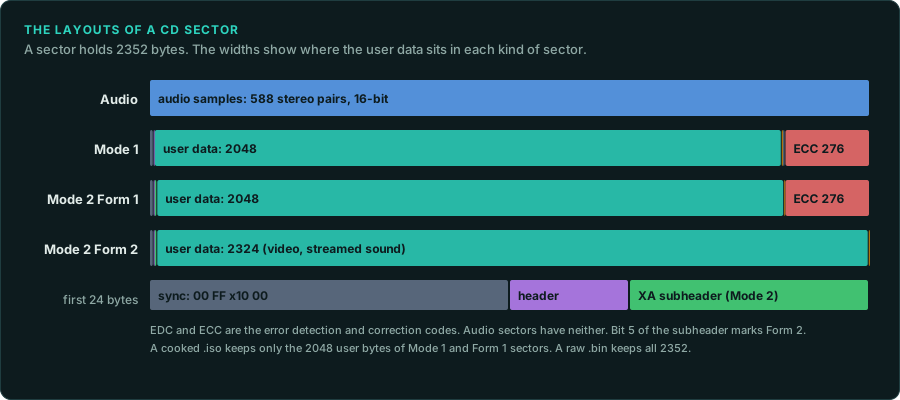
A CD is a list of sectors of 2352 bytes. 75 sectors play in one second, so positions are written as minutes, seconds and sectors (MM:SS:FF). The table of contents lists the tracks. Each track is audio or data.
| Sector kind | User bytes | Where the data starts in the 2352 | Used for |
|---|---|---|---|
| Audio (Red Book) | 2352 | 0 | Music: 588 stereo samples of 16 bits at 44,100 Hz |
| Mode 1 | 2048 | 16 | Files on most PC discs |
| Mode 2 Form 1 (CD-ROM XA) | 2048 | 24 | Files on PlayStation, CD-i and some PC discs |
| Mode 2 Form 2 (CD-ROM XA) | 2324 | 24 | Streamed video and sound, with no error correction |
A data sector starts with 12 bytes of sync pattern and 4 bytes of header, which give its address and its mode. A Mode 2 sector adds an 8-byte subheader, which says whether the sector is Form 1 or Form 2. The PlayStation's CD-ROM documentation describes how that console reads XA audio and STR video from Form 2 sectors.
The disc's first sector is at 00:02:00, after a two-second pregap that images do not store. Sector numbers inside the file systems (LBAs) start at that point. The start column in discinfo.py counts from the start of the image, so it does not add these two seconds.
Kinds of disc
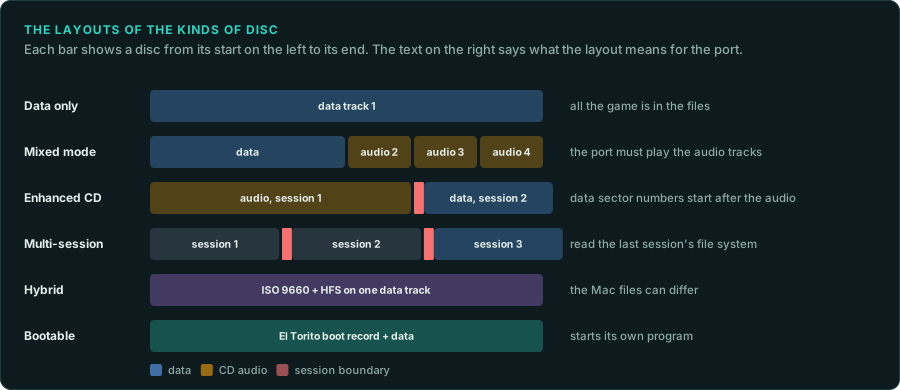
| Kind | Layout | What it means for the port |
|---|---|---|
| Data only | One data track | All the game is in the files |
| Mixed mode | Data in track 1, audio in tracks 2 onwards | The music is CD audio. The port must play the tracks |
| Enhanced CD (CD Extra) | Audio in the first session, data in a second session | The data's sector numbers start after the audio session |
| Multi-session | Several sessions, each with its own file system | Read the last session's file system. Earlier ones can hold older files |
| Hybrid | ISO 9660 and HFS on the same data track | The Mac files can differ from the PC files |
| Bootable | An El Torito boot record | The disc starts its own program without an installed system |
A game that plays CD audio does it through the system. A DOS game sends play requests through MSCDEX (interrupt 2Fh, function 1510h, with device request 132 for play audio). A Windows game uses MCI, such as mciSendCommand with the cdaudio device. Find those calls to find the game's table of track numbers, which says which music plays where.
File systems
| File system | Names | Notes |
|---|---|---|
| High Sierra | 8.3 | The format before ISO 9660. Early CD-ROMs only |
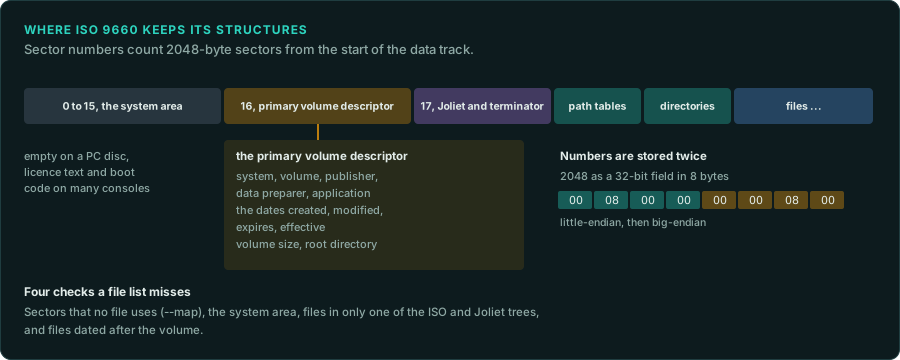
| ISO 9660 | 8.3 at level 1, with a version suffix ;1 | Every data CD has it. Numbers are stored twice, little-endian then big-endian |
| Joliet | Up to 64 UCS-2 characters | A second directory tree for Windows, added with Windows 95 |
| Rock Ridge | Long POSIX names and permissions | Unix discs. Stored inside each ISO 9660 record |
| HFS and HFS+ | Mac names, resource forks | Hybrid Mac and PC discs. Read them with hfsutils or HFSExplorer |
| UDF | Long names, large files | DVDs. A DVD usually carries ISO 9660 as well |
The ISO 9660 primary volume descriptor at sector 16 names the system, the volume, the publisher, the data preparer and the application that mastered the disc. It also holds four dates: created, modified, expires and effective. Each file record has its own date. These dates help to date a release and to tell two pressings apart.
A file record can be marked hidden. Some discs also list files whose sectors lie outside the volume's stated size, or give two files the same sectors. Some copy protections use these tricks. discinfo.py reports hidden files and files outside the volume.
Four more checks show what a file list alone misses:
- Sectors no file uses. A mastered disc accounts for nearly every sector.
--mapreads every sector of the data track and lists the runs that hold data but belong to no descriptor, path table, directory or file, with a guess at what each run holds. A file left over from development, a second copy of a file, or data the game reads by sector number can sit there. - The system area. Sectors 0 to 15 are empty on a PC disc. On a console disc they hold the licence text and the boot code: the PlayStation, the Saturn, the Mega-CD and the Dreamcast each use them.
discinfo.pynames what it finds. - Two trees that differ. The ISO 9660 and Joliet trees usually list the same files. A file missing from the Joliet tree is hidden from Windows. A mastering tool can leave files out on purpose.
discinfo.pylists each file that only one tree has, and copies it with the rest. - Files dated after the volume. The volume descriptor is written last when a disc is mastered. A file dated later suggests changed dates or a wrong clock.
Images
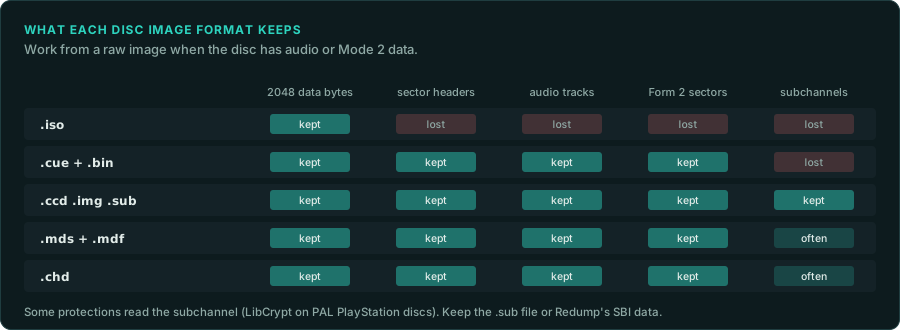
| Image | What it keeps | What it loses |
|---|---|---|
.iso | 2048 bytes of each data sector | Audio tracks, Form 2 sectors, sector headers, subchannels |
.cue and .bin (raw) | All 2352 bytes of every sector, every track | Subchannel data |
.ccd, .img, .sub (CloneCD) | Raw sectors and subchannels | Little |
.mds and .mdf (Alcohol 120%) | Raw sectors, often subchannels and timing | Little |
.chd (MAME) | Raw sectors, compressed | Nothing. chdman extractcd writes CUE and BIN |
Work from a raw image when the disc has audio or Mode 2 data. A .iso of such a disc lacks the music and the video. A file of Mode 2 Form 2 sectors, such as a PlayStation STR video or XA sound file, is marked in its directory record. discinfo.py --extract copies such a file as whole 2352-byte sectors, the form the tools for those formats read. A copy of 2048 bytes per sector would lose part of every sector. Some protections read the subchannel. One example is LibCrypt on PAL PlayStation discs. For those, keep the .sub file or the SBI data that Redump publishes for each disc.
Redump also lists the hashes of every track of verified dumps. Compare the hashes of your image with Redump's entry to learn which pressing you have.
In a few rips, the audio is stored big-endian. If an extracted track sounds like loud noise, extract it again with --swap.
Using discinfo
python3 tools/disc/discinfo.py target/cd/GAME.CUE                 # tracks, file systems, dates
python3 tools/disc/discinfo.py target/cd/GAME.CUE --files          # every file with its sector and date
python3 tools/disc/discinfo.py target/cd/GAME.CUE --extract target/cd/files --audio target/cd/audio
python3 tools/disc/discinfo.py target/cd/GAME.CUE --map            # data in sectors no file uses
python3 tools/disc/discinfo.py target/cd/GAME.CUE --json > derived/disc.json
scripts/extract-installer.sh recognises CD images and calls discinfo.py with --extract and --audio. The files and the audio are game material. Keep them in target/ or derived/. The report itself (track lengths, dates, identifiers) can go in docs/FINDINGS.md.
What to record
- Each track: data or audio, the mode, the length, and the session.
- The volume identifiers and dates, and the hashes of each track or of the image.
- Which tracks the game plays, and from which function. Then the port's music table can cite it.
- Any Form 2 data, hidden file, file outside the volume or second file system.
- The image format you worked from, and what it would have lost.
Ask your agent
In my GameFrame project, look at the game's CD image in target/cd/.

1. Run tools/disc/discinfo.py on it, with --files, and read docs/media/discs.md.
2. Record in docs/FINDINGS.md the tracks, the file systems, the volume identifiers and dates,
   and anything unusual: audio tracks, Form 2 sectors, hidden files, a Mac volume.
3. If there are audio tracks, find the code that plays them (MSCDEX or MCI calls) and list the
   game's track table with its address.
4. Extract the files into target/cd/files and the audio into target/cd/audio. Commit nothing
   from target/.